
ASP.NET(vb.net) & Table - asp:Table - asp:Table : Declares a table and allows you to manipulate it programmatically.
ShotDev Focus:
- ASP.NET(vb.net) & Table - asp:Table

Tag Control :
<asp:Table id="Table1"
BackImageUrl="url"
CellSpacing="cellspacing"
CellPadding="cellpadding"
GridLines="None|Horizontal|Vertical|Both"
HorizontalAlign="Center|Justify|Left|NotSet|Right"
runat="server">

<asp:TableRow>

<asp:TableCell>
Cell text
</asp:TableCell>

</asp:TableRow>

</asp:Table>
Example 1
Table1.aspx
<%@ Page Language="VB" %>
<script runat="server">
Sub Page_Load(sender As Object,e As EventArgs)
Me.Label1.Text = "www.ShotDev.Com 1"
Me.Label2.Text = "www.ShotDev.Com 2"
Me.Label3.Text = "www.ShotDev.Com 3"
End Sub
</script>
<html>
<head>
<title>ShotDev.Com Tutorial</title>
</head>
<body>
<form runat="server">
<asp:Table id="MyTable" runat="server" cellspacing="0" cellpadding="5" border="1">
<asp:TableRow runat="server">
<asp:TableCell colspan="2" runat="server">
<asp:Label id="Label1" text="Label" runat="Server" />
</asp:TableCell>
</asp:TableRow>
<asp:TableRow runat="server">
<asp:TableCell runat="server">
<asp:Label id="Label2" text="Label" runat="Server" />
</asp:TableCell>
<asp:TableCell runat="server">
<asp:Label id="Label3" text="Label" runat="Server" />
</asp:TableCell>
</asp:TableRow>
</asp:Table>
</form>
</body>
</html>
Screenshot
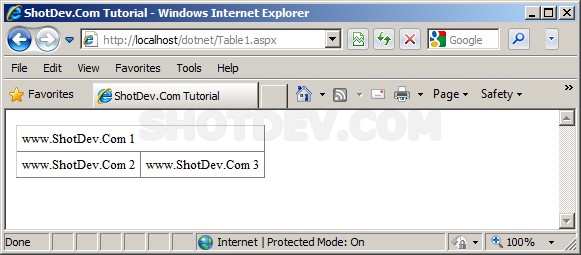
.
.
Example 2
Table2.aspx
<%@ Page Language="VB" %>
<script runat="server">

Sub Button1_Click(sender As Object, e As EventArgs)
Dim numrows As Integer
Dim numcells As Integer
Dim i As Integer
Dim j As Integer
Dim r As TableRow
Dim c As TableCell

' Generate rows and cells
numrows = CInt(DropDown1.SelectedItem.Value)
numcells = CInt(DropDown2.SelectedItem.Value)

For j = 0 To numrows-1

r = new TableRow()

For i = 0  To numcells-1
c = new TableCell()
c.Controls.Add(new LiteralControl("row " & j & ", cell " & i))
r.Cells.Add(c)
Next i

Table1.Rows.Add(r)
Next j
End Sub

</script>
<html>
<head>
<title>ShotDev.Com Tutorial</title>
</head>
<body>
<form runat="server">
Table rows:
<asp:DropDownList id="DropDown1" runat="server">
<asp:ListItem Value="1">1</asp:ListItem>
<asp:ListItem Value="2">2</asp:ListItem>
<asp:ListItem Value="3">3</asp:ListItem>
<asp:ListItem Value="4">4</asp:ListItem>
</asp:DropDownList>
Table cells:
<asp:DropDownList id="DropDown2" runat="server">
<asp:ListItem Value="1">1</asp:ListItem>
<asp:ListItem Value="2">2</asp:ListItem>
<asp:ListItem Value="3">3</asp:ListItem>
<asp:ListItem Value="4">4</asp:ListItem>
</asp:DropDownList>
<asp:button id="Button1" onclick="Button1_Click" runat="server" Text="Generate Table"></asp:button>
<hr>
<asp:Table id="Table1" runat="server" Gridlines="Both" BorderWidth="1" BorderColor="black" CellSpacing="0" CellPadding="5" Font-Size="8pt" Font-Names="Verdana"></asp:Table>
</form>
</body>
</html>
Screenshot
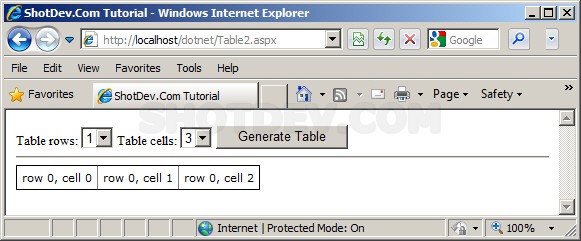
.
.
.
Download this script.


 Loading ...