
ASP.NET(vb.net) & DataList - Visual Studio .NET 2003 (Fx 1.1) Example scripts how to use DataList control in asp.net ,Development Sample scripts on Visual Studio .NET 2003 (FX 1.1).
ShotDev Focus:
- ASP.NET(vb.net) & DataList - Visual Studio .NET 2003 (Fx 1.1)
Example
DataList1.aspx
<%@ Page Language="vb" AutoEventWireup="false" Codebehind="DataList1.aspx.vb" Inherits="MyDotNet.DataList1"%>
<!DOCTYPE HTML PUBLIC "-//W3C//DTD HTML 4.0 Transitional//EN">
<HTML>
<HEAD>
<title>ShotDev.Com Tutorial</title>
<meta name="GENERATOR" content="Microsoft Visual Studio .NET 7.1">
<meta name="CODE_LANGUAGE" content="Visual Basic .NET 7.1">
<meta name="vs_defaultClientScript" content="JavaScript">
<meta name="vs_targetSchema" content="http://schemas.microsoft.com/intellisense/ie5">
</HEAD>
<body MS_POSITIONING="GridLayout">
<form id="Form1" method="post" runat="server">
<asp:DataList id="myDataList" RepeatColumns="2" runat="server">
<HeaderTemplate>
<b>My Category</b>
</HeaderTemplate>
<ItemTemplate>
<div style="width:100px" align="center">
<asp:Image id="imgPicture" runat="server"></asp:Image>
<br />
<asp:HyperLink id="hplCategory" runat="server"></asp:HyperLink>
</div>
</ItemTemplate>
</asp:DataList>
</form>
</body>
</HTML>
DataList1.aspx.vb
Imports System.Data
Imports System.Data.OleDb
Public Class DataList1
Inherits System.Web.UI.Page

#Region " Web Form Designer Generated Code "

<System.Diagnostics.DebuggerStepThrough()> Private Sub InitializeComponent()

End Sub
Protected WithEvents myDataList As DataList

Private designerPlaceholderDeclaration As System.Object

Private Sub Page_Init(ByVal sender As System.Object, ByVal e As System.EventArgs) Handles MyBase.Init
InitializeComponent()
End Sub

#End Region
Dim objConn As OleDbConnection
Dim objCmd As OleDbCommand

Private Sub Page_Load(ByVal sender As System.Object, ByVal e As System.EventArgs) Handles MyBase.Load
Dim strConnString As String
strConnString = "Provider=Microsoft.Jet.OLEDB.4.0;Data Source=" & _
Server.MapPath("database/mydatabase.mdb") & ";"
objConn = New OleDbConnection(strConnString)
objConn.Open()

BindData()
End Sub

Private Sub BindData()
Dim strSQL As String
strSQL = "SELECT * FROM category"

Dim dtReader As OleDbDataReader
objCmd = New OleDbCommand(strSQL, objConn)
dtReader = objCmd.ExecuteReader()

'*** BindData to DataList ***'
myDataList.DataSource = dtReader
myDataList.DataBind()

dtReader.Close()
dtReader = Nothing

End Sub

Private Sub Page_Unload(ByVal sender As Object, ByVal e As System.EventArgs) Handles MyBase.Unload
objConn.Close()
objConn = Nothing
End Sub

Private Sub myDataList_ItemDataBound(ByVal sender As Object, ByVal e As DataListItemEventArgs) Handles myDataList.ItemDataBound
'*** Image ***'
Dim img As System.Web.UI.WebControls.Image = CType(e.Item.FindControl("imgPicture"), System.Web.UI.WebControls.Image)
If Not IsNothing(img) Then
img.ImageUrl = "images/" & e.Item.DataItem("Picture")
'img.Attributes.Add("OnClick","window.location='http://www.shotdev.com?CateID="&e.Item.DataItem("CategoryID")&"'")
'img.Style.Add("cursor","hand")
End If

'*** HyperLink ***'
Dim hplCate As HyperLink = CType(e.Item.FindControl("hplCategory"), HyperLink)
If Not IsNothing(hplCate) Then
hplCate.Text = e.Item.DataItem("CategoryName")
hplCate.ToolTip = e.Item.DataItem("CategoryName")
hplCate.NavigateUrl = "http://www.shotdev.com?CateID=" & e.Item.DataItem("CategoryID")
End If
End Sub
End Class
Create a asp.net file and save to path root-path/dotnet/
Run
http://localhost/dotnet/DataList1.aspx
Screenshot
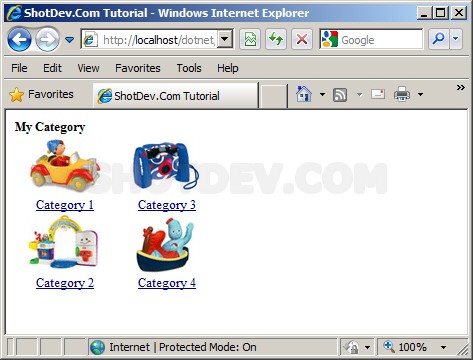
.
.
.
Download this script.


 Loading ...