
ASP.NET(vb.net) & FormView - AllowPaging/Pagination Example scripts how to use FormView control in asp.net , The AllowPaging gets or sets a value indicating whether the paging feature is enabled.
ShotDev Focus:
- ASP.NET(vb.net) & FormView - AllowPaging
Example
FormViewAllowPaging.aspx
<%@ Import Namespace="System.Data"%>
<%@ Import Namespace="System.Data.OleDb"%>
<%@ Page Language="VB" %>
<script runat="server">
Sub Page_Load(sender As Object, e As EventArgs)
IF Not Page.IsPostBack() Then
BindData()
End IF
End Sub

Sub BindData()

Dim objConn As New OleDbConnection
Dim objCmd As New OleDbCommand
Dim dtAdapter As New OleDbDataAdapter
Dim ds As New DataSet
Dim strConnString,strSQL As String

strConnString = "Provider=Microsoft.Jet.OLEDB.4.0;Data Source="&Server.MapPath("database/mydatabase.mdb")&";"
strSQL = "SELECT * FROM gallery"

objConn.ConnectionString = strConnString
With objCmd
.Connection = objConn
.CommandText = strSQL
.CommandType = CommandType.Text
End With
dtAdapter.SelectCommand = objCmd

dtAdapter.Fill(ds)

'*** BindData to FormView ***'
myFormView.DataSource = ds
myFormView.DataBind()

dtAdapter = Nothing
objConn.Close()
objConn = Nothing

End Sub

Sub myFormView_DataBound(ByVal sender As Object, ByVal e As System.EventArgs)

'*** Image ***'
Dim Image1 As Image = CType(myFormView.FindControl("Image1"),Image)
IF Not IsNothing(Image1) Then
Image1.ImageUrl = "images/"&myFormView.DataItem("Picture")
Image1.Attributes.Add("OnClick", "window.open('images/"&myFormView.DataItem("Picture")&"')")
Image1.Style.Add("cursor","hand")
Image1.ToolTip = myFormView.DataItem("GalleryName")
End IF

'*** GalleryName ***'
Dim lblGalleryName As Label = CType(myFormView.FindControl("lblGalleryName"),Label)
IF Not IsNothing(lblGalleryName) Then
lblGalleryName.Text = myFormView.DataItem("GalleryName")
End IF

End Sub

Sub ShowPageCommand(s As Object, e As FormViewPageEventArgs)
myFormView.PageIndex = e.NewPageIndex
BindData()
End Sub

</script>
<html>
<head>
<title>ShotDev.Com Tutorial</title>
</head>
<body>
<form id="form1" runat="server">
<asp:FormView id="myFormView" runat="server"
OnDataBound="myFormView_DataBound"
OnPageIndexChanging="ShowPageCommand"
AllowPaging="True">
<ItemTemplate>
<table width="500" cellpadding="5" border="0">
<tr>
<td valign="top" align="center">
<asp:Image id="Image1" runat="server"/>
<br />
<h2><asp:Label id="lblGalleryName" runat="server"></asp:Label></h2>
</td>
</tr>
</table>
</ItemTemplate>
</asp:FormView>
</form>
</body>
</html>
Create a asp.net file and save to path root-path/dotnet/
Run
http://localhost/dotnet/FormViewAllowPaging.aspx
Screenshot
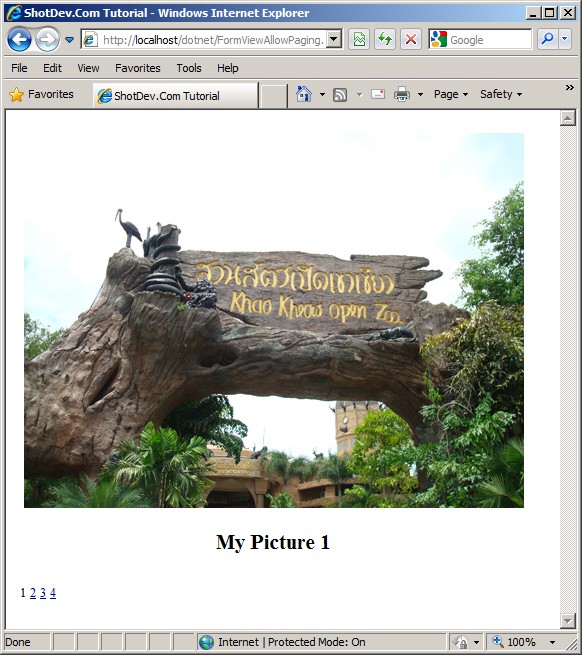
.
.
.
Download this script.


 Loading ...