
ASP.NET(vb.net) & FormView - XML Example scripts how to use FormView control in asp.net , Binding the datasource (XML) to FormView control.
ShotDev Focus:
- ASP.NET(vb.net) & FormView - XML
gallery.xml
<?xml version="1.0" encoding="UTF-8"?>
<mygallery>
<gallery>
<GalleryID>1</GalleryID>
<GalleryName>My Picture 1</GalleryName>
<Picture>DSC01683.jpg</Picture>
</gallery>
<gallery>
<GalleryID>2</GalleryID>
<GalleryName>My Picture 2</GalleryName>
<Picture>DSC01719.jpg</Picture>
</gallery>
<gallery>
<GalleryID>3</GalleryID>
<GalleryName>My Picture 3</GalleryName>
<Picture>DSC01805.jpg</Picture>
</gallery>
<gallery>
<GalleryID>4</GalleryID>
<GalleryName>My Picture 4</GalleryName>
<Picture>DSC01806.jpg</Picture>
</gallery>
</mygallery>
Example
FormViewReadXML.aspx
<%@ Import Namespace="System.Data"%>
<%@ Import Namespace="System.Data.OleDb"%>
<%@ Page Language="VB" %>
<script runat="server">
Sub Page_Load(sender As Object, e As EventArgs)
IF Not Page.IsPostBack() Then
BindData()
End IF
End Sub

Sub BindData()

Dim ds As New DataSet
ds.ReadXml(MapPath("gallery.xml"))

'*** BindData to FormView ***'
myFormView.DataSource = ds
myFormView.DataBind()

End Sub

Sub myFormView_DataBound(ByVal sender As Object, ByVal e As System.EventArgs)

'*** Image ***'
Dim Image1 As Image = CType(myFormView.FindControl("Image1"),Image)
IF Not IsNothing(Image1) Then
Image1.ImageUrl = "images/"&myFormView.DataItem("Picture")
Image1.Attributes.Add("OnClick", "window.open('images/"&myFormView.DataItem("Picture")&"')")
Image1.Style.Add("cursor","hand")
Image1.ToolTip = myFormView.DataItem("GalleryName")
End IF

'*** GalleryName ***'
Dim lblGalleryName As Label = CType(myFormView.FindControl("lblGalleryName"),Label)
IF Not IsNothing(lblGalleryName) Then
lblGalleryName.Text = myFormView.DataItem("GalleryName")
End IF

End Sub

Sub ShowPageCommand(s As Object, e As FormViewPageEventArgs)
myFormView.PageIndex = e.NewPageIndex
BindData()
End Sub

</script>
<html>
<head>
<title>ShotDev.Com Tutorial</title>
</head>
<body>
<form id="form1" runat="server">
<asp:FormView id="myFormView" runat="server"
OnDataBound="myFormView_DataBound"
OnPageIndexChanging="ShowPageCommand"
AllowPaging="True">
<ItemTemplate>
<table width="500" cellpadding="5" border="0">
<tr>
<td valign="top" align="center">
<asp:Image id="Image1" runat="server"/>
<br />
<h2><asp:Label id="lblGalleryName" runat="server"></asp:Label></h2>
</td>
</tr>
</table>
</ItemTemplate>
</asp:FormView>
</form>
</body>
</html>

[code='vb']
Create a asp.net file and save to path root-path/dotnet/
Run
http://localhost/dotnet/FormViewReadXML.aspx
Screenshot
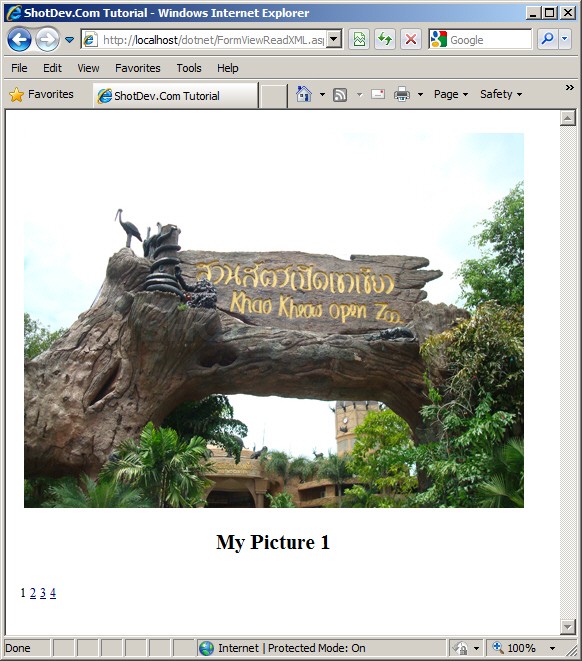
.
.
.
Download this script.


 Loading ...