
ASP.NET(vb.net) & ListView - DataBound Example scripts how to use ListView control in asp.net , The DataBound Occurs when an item is data bound to the ListView control
ShotDev Focus:
- ASP.NET(vb.net) & ListView - DataBound
Example
ListViewDataBound.aspx
<%@ Import Namespace="System.Data"%>
<%@ Import Namespace="System.Data.OleDb"%>
<%@ Page Language="VB" %>
<script runat="server">

Dim objConn As OleDbConnection
Dim objCmd As OleDbCommand

Sub Page_Load(sender As Object, e As EventArgs)
Dim strConnString As String
strConnString = "Provider=Microsoft.Jet.OLEDB.4.0;Data Source="&Server.MapPath("database/mydatabase.mdb")&";"
objConn = New OleDbConnection(strConnString)
objConn.Open()

BindData()
End Sub

Sub BindData()
Dim strSQL As String
strSQL = "SELECT * FROM customer"

Dim dtReader As OleDbDataReader
objCmd = New OleDbCommand(strSQL, objConn)
dtReader = objCmd.ExecuteReader()

'*** BindData to ListView ***'
myListView.DataSource = dtReader
myListView.DataBind()

dtReader.Close()
dtReader = Nothing

End Sub

Protected Sub myListView_ItemDataBound(ByVal sender As Object, ByVal e As ListViewItemEventArgs) Handles myListView.ItemDataBound

Dim lvDataItem As ListViewDataItem = CType(e.Item, ListViewDataItem)

'*** CustomerID ***'
Dim lblCustomerID As Label = CType(e.Item.FindControl("lblCustomerID"),Label)
IF Not IsNothing(lblCustomerID) Then
lblCustomerID.Text = lvDataItem.DataItem("CustomerID")
End IF

'*** Name ***'
Dim lblName As Label = CType(e.Item.FindControl("lblName"),Label)
IF Not IsNothing(lblName) Then
lblName.Text = lvDataItem.DataItem("Name")
End IF

'*** Email ***'
Dim lblEmail As Label = CType(e.Item.FindControl("lblEmail"),Label)
IF Not IsNothing(lblEmail) Then
lblEmail.Text = lvDataItem.DataItem("Email")
End IF

'*** CountryCode ***'
Dim lblCountryCode As Label = CType(e.Item.FindControl("lblCountryCode"),Label)
IF Not IsNothing(lblCountryCode) Then
lblCountryCode.Text = lvDataItem.DataItem("CountryCode")
End IF

'*** Budget ***'
Dim lblBudget As Label = CType(e.Item.FindControl("lblBudget"),Label)
IF Not IsNothing(lblBudget) Then
lblBudget.Text = lvDataItem.DataItem("Budget")
End IF

'*** Used ***'
Dim lblUsed As Label = CType(e.Item.FindControl("lblUsed"),Label)
IF Not IsNothing(lblUsed) Then
lblUsed.Text = lvDataItem.DataItem("Used")
End IF
End Sub

Sub Page_UnLoad()
objConn.Close()
objConn = Nothing
End Sub

</script>
<html>
<head>
<title>ShotDev.Com Tutorial</title>
</head>
<body>
<form id="form1" runat="server">
<asp:ListView ID="myListView" runat="server" DataKeyNames="CustomerID">

<LayoutTemplate>
<table>
<tr>
<td>
<table runat="server" border="1">
<tr>
<th runat="server">
CustomerID</th>
<th runat="server">
Name</th>
<th runat="server">
Email</th>
<th runat="server">
CountryCode</th>
<th runat="server">
Budget</th>
<th runat="server">
Used</th>
</tr>
<tr ID="itemPlaceholder" runat="server">
</tr>
</table>
</td>
</tr>
</table>
</LayoutTemplate>

<ItemTemplate>
<tr>
<td>
<asp:Label ID="lblCustomerID" runat="server"/>
</td>
<td>
<asp:Label ID="lblName" runat="server"/>
</td>
<td>
<asp:Label ID="lblEmail" runat="server"/>
</td>
<td>
<asp:Label ID="lblCountryCode" runat="server" />
</td>
<td>
<asp:Label ID="lblBudget" runat="server" />
</td>
<td>
<asp:Label ID="lblUsed" runat="server" />
</td>
</tr>
</ItemTemplate>

</asp:ListView>
</form>
</body>
</html>
Create a asp.net file and save to path root-path/dotnet/
Run
http://localhost/dotnet/ListViewDataBound.aspx
Screenshot
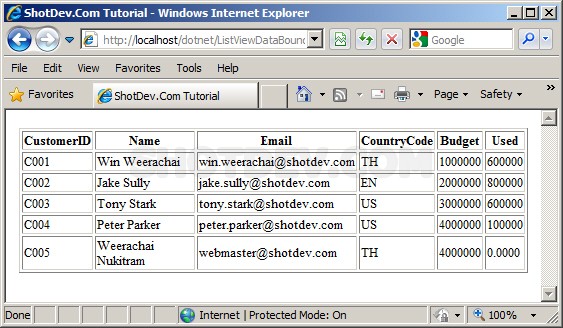
.
.
.
Download this script.


 Loading ...