
How to use PHP & Convert/Export To CSV and Send Email Attachment Learn / tutorial php programming how to using PHP Convert/Export To CSV and Send Email Attachment
ShotDev Focus:
- PHP Convert/Export To CSV and Send Email Attachment.
Example
php_csv_mail1.php
<html>
<head>
<title>ShotDev.Com Tutorial</title>
</head>
<body>
<?
$objConnect = mysql_connect("localhost","root","root") or die(mysql_error());
$objDB = mysql_select_db("mydatabase");
$strSQL = "SELECT * FROM customer";
$objQuery = mysql_query($strSQL) or die ("Error Query [".$strSQL."]");
?>
<table width="600" border="1">
<tr>
<th width="91"> <div align="center">CustomerID </div></th>
<th width="98"> <div align="center">Name </div></th>
<th width="198"> <div align="center">Email </div></th>
<th width="97"> <div align="center">CountryCode </div></th>
<th width="59"> <div align="center">Budget </div></th>
<th width="71"> <div align="center">Used </div></th>
</tr>
<?
while($objResult = mysql_fetch_array($objQuery))
{
?>
<tr>
<td><div align="center"><?=$objResult["CustomerID"];?></div></td>
<td><?=$objResult["Name"];?></td>
<td><?=$objResult["Email"];?></td>
<td><div align="center"><?=$objResult["CountryCode"];?></div></td>
<td align="right"><?=$objResult["Budget"];?></td>
<td align="right"><?=$objResult["Used"];?></td>
</tr>
<?
}
?>
</table>
<?
mysql_close($objConnect);
?>
<div align="center"><br>
<input name="btnExport" type="button" value="Export / Send Mail" onClick="JavaScript:window.location='php_csv_mail2.php';">
</div>
</body>
</html>
php_csv_mail2.php
<html>
<head>
<title>ShotDev.Com Tutorial</title>
</head>
<body>
<?
$strPath = "shotdev";
$filName = "customer.csv";
$objWrite = fopen($strPath."/".$filName, "w");

$objConnect = mysql_connect("localhost","root","root") or die(mysql_error());
$objDB = mysql_select_db("mydatabase");
$strSQL = "SELECT * FROM customer";
$objQuery = mysql_query($strSQL) or die ("Error Query [".$strSQL."]");

while($objResult = mysql_fetch_array($objQuery))
{
fwrite($objWrite, "\"$objResult[CustomerID]\",\"$objResult[Name]\",\"$objResult[Email]\",");
fwrite($objWrite, "\"$objResult[CountryCode]\",\"$objResult[Budget]\",\"$objResult[Used]\" \n");
}
fclose($objWrite);

//*************** Send Email ***************//

$strTo = "[email protected]";
$strSubject = "CSV Report";
$strMessage = "Download $filName for CSV Report";

//*** Uniqid Session ***//
$strSid = md5(uniqid(time()));

$strHeader = "";
$strHeader .= "From: Mr.Weerachai Nukitram<[email protected]>\nReply-To: [email protected]\n";
$strHeader .= "Cc: Mr.Surachai Sirisart<[email protected]>";
$strHeader .= "Bcc: [email protected]";

$strHeader .= "MIME-Version: 1.0\n";
$strHeader .= "Content-Type: multipart/mixed; boundary=\"".$strSid."\"\n\n";
$strHeader .= "This is a multi-part message in MIME format.\n";

$strHeader .= "--".$strSid."\n";
$strHeader .= "Content-type: text/html; charset=windows-874\n"; // or UTF-8 //
$strHeader .= "Content-Transfer-Encoding: 7bit\n\n";
$strHeader .= $strMessage."\n\n";

$strContent1 = chunk_split(base64_encode(file_get_contents($strPath."/".$filName)));
$strHeader .= "--".$strSid."\n";
$strHeader .= "Content-Type: application/octet-stream; name=\"".$filName."\"\n";
$strHeader .= "Content-Transfer-Encoding: base64\n";
$strHeader .= "Content-Disposition: attachment; filename=\"".$filName."\"\n\n";
$strHeader .= $strContent1."\n\n";

$flgSend = @mail($strTo,$strSubject,null,$strHeader); // @ = No Show Error //
if($flgSend)
{
echo "CSV Generated & Email Sending.";
}
else
{
echo "Can not send mail.";
}
?>
</body>
</html>
Create a php file and save to path root-path/myphp/
Run
http://localhost/myphp/php_csv_mail2.php
Screenshot
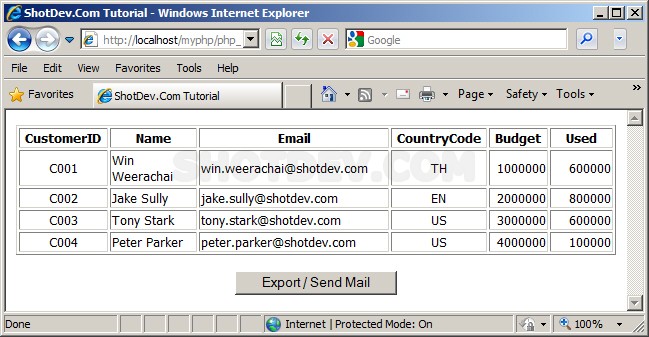
.
.
.
Download this script.



 Loading ...